


Hersheypark
4.71.47K Reviews
App Specs
- Version
- 3.1.46
- Updated On
- License
- Free
- Downloads
- 500,000+
- Developer
- Hershey Entertainment and Resorts Company
- Categories
- Travel & Local
- Platform
- Android, iOS
Screenshots

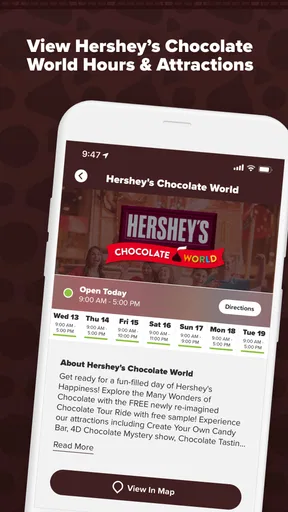
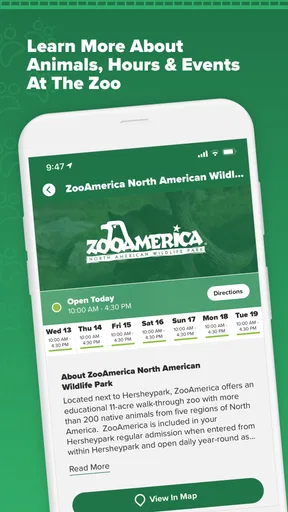
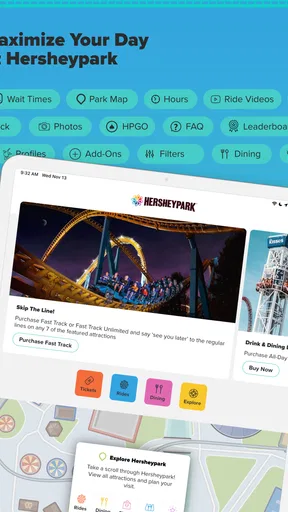
 Analysis by AppCompare
Have you ever dreamt of having an amusement park in your pocket? Well, the Hersheypark app makes that dream a reality. Whether you're a thrill-seeker or someone who just wants to indulge in some chocolatey goodness, this app is your ultimate companion for exploring Hersheypark. Let me walk you through the ins and outs of this app, and why it’s a must-download before you step foot in the park.
First Impressions and User Interface
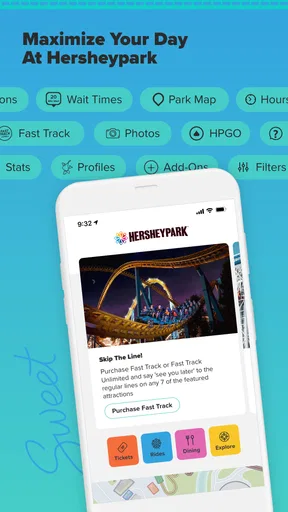
From the moment you open the Hersheypark app, you’re greeted with a layout that’s as sweet as the park itself. The interface is intuitive, with easy-to-navigate menus and eye-catching graphics that make it fun to explore. You can quickly find what you need without getting lost in a maze of options – which is more than I can say for some other park apps out there!
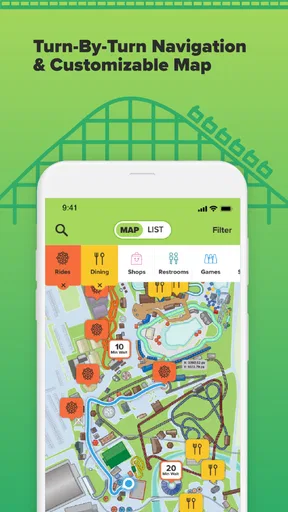
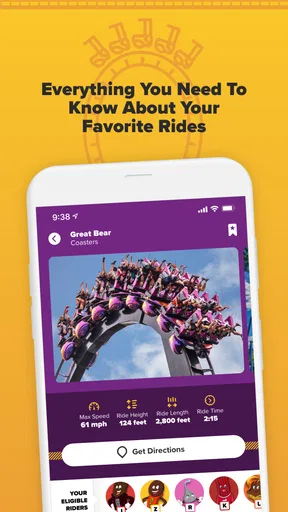
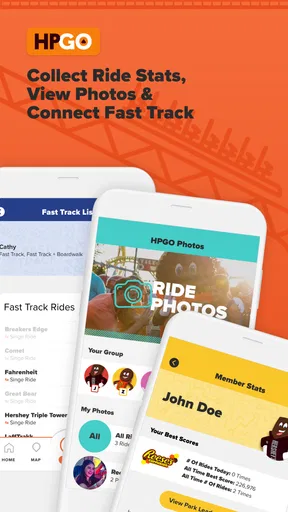
The home screen is your hub. It’s got everything you need: park map, ride wait times, dining options, and even a planner for your day. The design is clean and colorful, making it super user-friendly. I particularly loved how the map is interactive, letting you tap on rides to get more info or find the nearest restroom – truly a lifesaver!
Readability and Finding Your Way
The strongest part of the design is the way it puts park information in one place. Instead of bouncing between a general map app, a search for dining, and scraps of notes, I can use the park map to orient myself and then check the relevant ride or food details. That matters most when a group is deciding what to do next while already on the move. A quick glance is more useful than a polished screen that takes several taps to explain where you are.
For a first visit, I’d use the map before arriving to get a rough sense of the park, then keep it open as a reference rather than trying to plan every turn in advance. The interactive map is especially useful for pairing a destination with a nearby practical stop, such as a restroom. It can reduce unnecessary backtracking, though it won’t make a busy park feel simple at every moment; landmarks and the people around you still matter when you’re navigating a crowd.
Features that Sweeten the Deal
One of my favorite features of the app is the real-time ride wait times. Let’s be real – no one wants to spend their day standing in line when there are coasters to ride and chocolate to eat. The app updates continuously, helping you make the most of your time by hitting the shorter lines first. It’s like having an insider’s scoop on the best times to hit your favorite rides.
I treat those times as a planning aid, not a promise. A displayed wait can change while you walk across the park, so I’d check again before making a long detour for one particular ride. A useful approach is to compare a couple of nearby choices: if one line has grown, you can decide whether another attraction suits the group rather than crossing the park based on a single number. That small habit helps keep the day flexible.
Worth Reading Before You Choose

EA SPORTS FC Mobile 26 Is a Bigger Football Game, but It Takes Time

Flipboard Shows What News Apps Must Do Beyond the Feed

Switching to Android Auto Means Rethinking Your Driving Routine

Google Calendar Makes a Crowded Week Easier to Manage

Ludo King Makes the Most of the Minutes Between Plans

Baby Panda World Brings Quick Play to Modern Phones, but Its Game Library Feels Busy
The Dining section is another winner. You can browse through all the food options available in the park, complete with menus and prices. As someone who’s always on the lookout for the next best snack, this feature was a game-changer. No more wandering around aimlessly when you’re hungry; just a quick tap, and you know exactly where to go for that giant pretzel or Hershey’s chocolate shake.
It is also handy to browse before hunger becomes urgent. I can check the options while the group is resting, compare what sounds appealing, and choose a direction before everyone is tired and impatient. Menus and prices make that decision more concrete than relying on a vague memory of a stand spotted earlier. For dietary needs, I would use the app as a starting point for deciding where to ask questions, rather than assuming a menu view answers every ingredient or preparation concern.
Planning Your Sweet Adventure
The planner tool in the app is perfect for those who like to have their day mapped out. You can add rides, shows, and dining spots to your planner, keeping everything organized and at your fingertips. It’s like having a personal assistant, minus the cost!
I wouldn’t fill the planner with a rigid schedule from opening to close. Instead, I’d add a few priorities—perhaps a must-ride coaster, a show, and a meal stop—and leave room to react to wait times or a change in energy. This is a better fit for a park day than treating each entry as an appointment. Families with different preferences can use those saved priorities to agree on what matters most, while still leaving space for someone to take a break.
And if you’re visiting with family or friends, the app’s location-sharing feature is a huge plus. You can easily keep track of everyone’s whereabouts, ensuring no one misses out on the fun.
In practice, location sharing is most useful as a backup for a group that may split up, not as a substitute for choosing a meeting point. Before separating, I’d agree on where to regroup and when to check in; that gives everyone a clear plan if phones are hard to use in a noisy or crowded moment. It is a practical convenience, but it works best when the group is comfortable using phone-based location tools and has discussed expectations.
Motor, Sensory, and Situational Considerations
For someone who finds busy screens tiring, the map and planner can help reduce the amount of information they need to remember while walking. I’d prepare a short list of priorities before the visit and use the app in brief checks, rather than constantly studying the screen. That can also make it easier for a companion to help with navigation without turning the whole day into phone management.
There is a trade-off: using a phone while walking through crowds asks for attention and hand control at exactly the moment when watching your surroundings matters. I’d stop somewhere safe to check directions or compare options, especially when accompanying children or someone who moves at a different pace. The app can support coordination, but it cannot replace a conversation about breaks, meeting points, or what to do if the group gets separated.
Its value also changes with the visit. On a first trip, the park map and searchable details can ease the uncertainty of choosing where to go. On a return visit with a familiar routine, the planner may matter less, while current wait information and food choices can still help with decisions. If you prefer to keep your phone put away, a simple agreed route and meeting plan may be more comfortable than relying on frequent checks.
A Few Little Extras
The app doesn’t just stop at rides and food. It also offers some neat extras that enhance your park experience. For instance, there are exclusive offers and deals available through the app that you won’t find elsewhere. Plus, the app provides updates on special events happening throughout the day, so you’re always in the loop.
Those extras are most useful when they support a plan you already want to make, rather than becoming a reason to keep checking the screen. I’d look over event information and offers before choosing a route, then check again if the day’s plans change. This helps keep the phone in a supporting role: the point is to enjoy the park, not to chase every notification or turn a casual visit into a checklist.
And let’s not forget about the Hershey characters. The app lets you know where and when you can meet your favorite Hershey’s characters. It’s perfect for capturing those memorable moments, especially if you’ve got little ones in tow.
For a family, character information can help make a child’s favorite encounter part of the day without having to improvise after arriving. I’d check the timing alongside nearby plans, since a character stop may be more enjoyable when nobody is rushing to get across the park. It’s a small planning detail, but it can turn an otherwise ordinary gap between rides into a moment the group remembers.
Who Will Get the Most from It
This is a focused companion for a Hersheypark visit, not a general travel planner. The app is free, and Hershey Entertainment and Resorts Company is its developer. Its travel-and-local role is clear: the useful information concerns getting around and making choices inside this particular park. For comparing hotels, planning the drive, or finding attractions beyond the park, a regular map or travel app is the better tool; for rides, dining, and park-day organization, this one keeps the relevant tasks together.
It makes the most sense for first-time visitors, families coordinating different interests, and anyone who wants to choose rides and meals as the day unfolds. Someone who already knows the park and prefers an unstructured visit may only need it occasionally. Likewise, visitors who avoid phone use or do not want location sharing should not feel they must use every feature: the map and planning tools can still be useful on their own, while the group can rely on a spoken plan instead.
The app has a 4.6 average from around 9,200 ratings, with roughly 1,400 written reviews and over 500,000 installs. Those figures suggest it is a familiar option for parkgoers, but they don’t tell me whether its approach suits every visitor. I’d judge it by the practical question: does keeping park details together make your own day easier? For me, the answer is yes, especially when the group has several priorities and wants to avoid aimless walks.
What to Expect Before You Go
The app is free and rated for Everyone, so it is easy to consider for a family visit. It is currently version 3.1.44 and supports operating systems from version 8.0. I’d install it and look through the map and planner before setting out, rather than waiting until the group is standing at an entrance trying to decide what to do first. A little preparation makes the tools more useful without requiring a minute-by-minute itinerary.
One realistic way to use it is to check the map while planning the morning, choose a few rides each person cares about, and save a meal option for later. Once inside, compare wait times before crossing to another area, then use the dining section when the group is ready to eat. If plans change, the location-sharing feature can help reconnect people who have split up. That workflow uses the app for decisions that benefit from information, while leaving the rest of the day open.
It is not the right choice if what you need is a complete trip-planning service or if you expect an app to make every decision for you. Nor would I depend on it as the only way a group communicates: phones can be distracting, and people may prefer a clear offline meeting plan. Its best role is narrower and more useful—helping visitors make informed choices about a day at Hersheypark.
Wrapping It Up
All in all, the Hersheypark app is an essential tool for anyone planning a visit to this chocolate-filled wonderland. Its intuitive design, coupled with a wealth of features, ensures you’ll have a sweet and seamless experience. Whether you're there for the rides, the food, or just to meet a giant Hershey’s Kiss, this app has got you covered.
I’d recommend it most to visitors who want a convenient reference for rides, dining, and getting around, and who are happy to use a phone as part of their day. I’d be more cautious about calling it essential for someone who already knows the park, prefers paper notes, or wants to stay off their device. The app can make choices easier, but a good visit still depends on pacing, flexibility, and paying attention to the people you’re with.
So, before you head out on your Hersheypark adventure, make sure to download the app and get ready for a day of fun, laughter, and of course, chocolate!
Pros
- User-friendly interface with smooth navigation.
- Comprehensive map with ride locations.
- Real-time wait times for attractions.
- Customizable itineraries for personal plans.
- Exclusive deals and discounts for app users.
Cons
- Requires constant internet connection.
- Battery consumption can be high.
- Limited offline functionality.
- Occasional glitches in real-time updates.
- Some features locked behind registration.
FAQs for Hersheypark
What is Hersheypark's official app used for?
The Hersheypark app is designed to enhance your visit to the amusement park by providing real-time information on attractions, dining options, and live shows. It includes features like an interactive map, ride wait times, and personalized itineraries to ensure you make the most of your day at the park.
Is the Hersheypark app available for both Android and iOS devices?
Yes, the Hersheypark app is available for download on both Android and iOS devices. You can find it on the Google Play Store and the Apple App Store. Ensure your device meets the app's compatibility requirements for optimal performance.
Does the Hersheypark app require an internet connection to function?
While the app can be browsed offline, it requires an internet connection to access real-time updates such as ride wait times, show schedules, and any special event notifications. It's recommended to have a stable connection to fully utilize all features.
Are there any in-app purchases or hidden fees in the Hersheypark app?
The Hersheypark app is free to download and use. There are no hidden fees or in-app purchases. However, it does provide links to purchase park tickets and other experiences, which are external transactions outside the app itself.
How user-friendly is the Hersheypark app for first-time visitors?
The Hersheypark app is designed with a user-friendly interface that is intuitive for first-time visitors. It features easy navigation, clear icons, and step-by-step instructions to help users quickly find the information they need, making it accessible for people of all ages.


